If you own a business website in the United States, there is a law you may be overlooking and ignoring it could cost you tens of thousands of dollars. The Americans with Disabilities Act (ADA) applies to your website, and lawsuits for non-compliance are surging at a record pace in 2026. This guide explains what ADA website compliance means, who it applies to, what you need to do, and how to protect your business before it is too late.
What Is ADA Website Compliance?
The Americans with Disabilities Act was signed into law in 1990 to ensure equal access for people with disabilities. Originally focused on physical spaces ramps, accessible restrooms, parking courts have since extended its reach to the digital world.
Today, if your website is not accessible to people with visual, auditory, motor, or cognitive disabilities, it can be considered a violation of the ADA. This means your site must work with screen readers, be navigable by keyboard alone, have sufficient color contrast, include captions for videos, and meet dozens of other technical requirements.
The short answer: If your business serves the public and has a website, ADA compliance applies to you.
What Is the Legal Standard? (WCAG 2.1 Level AA)
The practical benchmark for ADA website compliance is the Web Content Accessibility Guidelines (WCAG) 2.1 Level AA, published by the World Wide Web Consortium (W3C). While the ADA itself does not mention WCAG by name, courts and the Department of Justice (DOJ) consistently reference it as the technical standard businesses should follow.
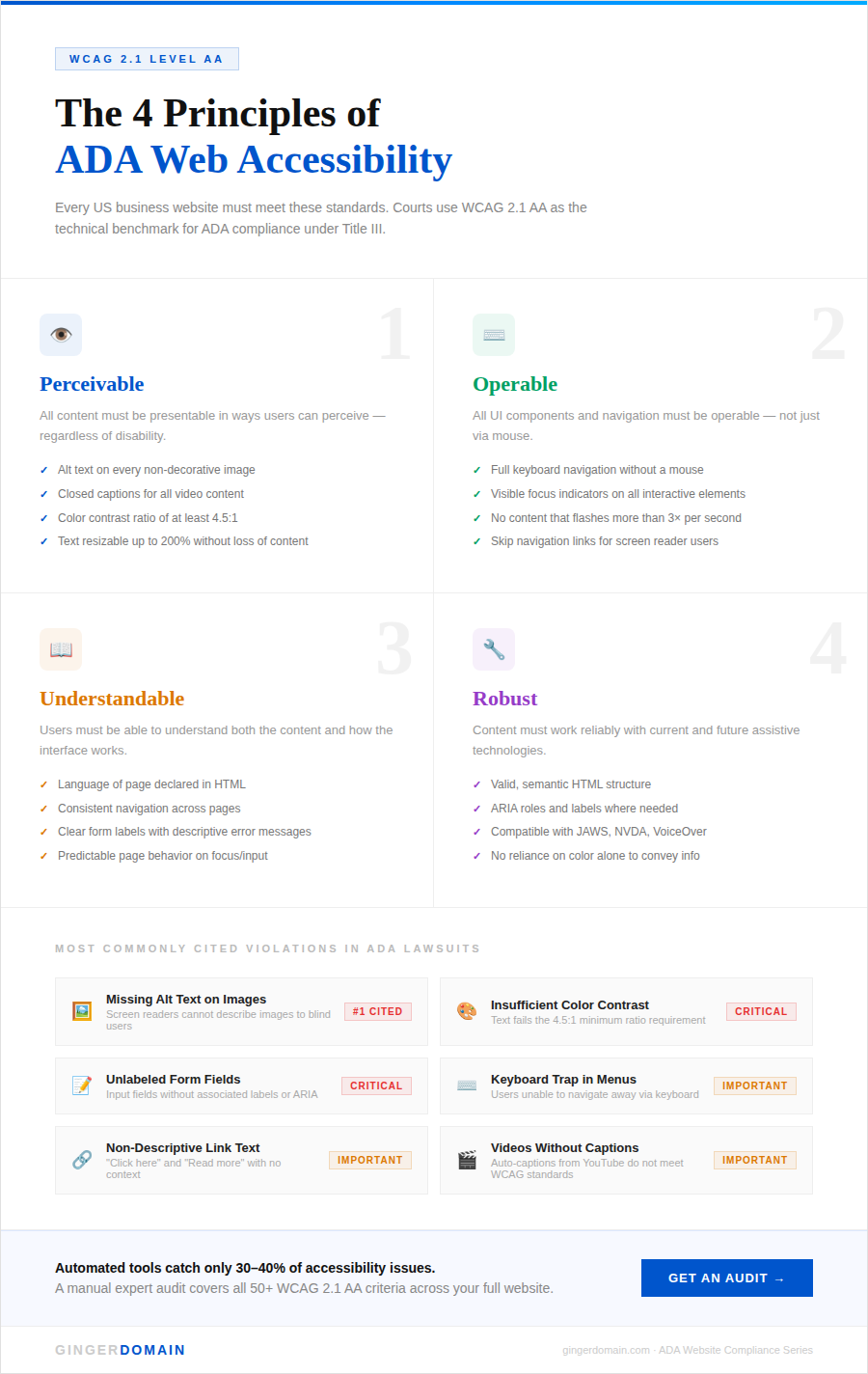
WCAG 2.1 AA is built around four core principles. Your website content must be:
- Perceivable — Users must be able to see or hear all content. This includes alt text for images, captions for videos, and text that can be resized without losing functionality.
- Operable — All functionality must work via keyboard, not just a mouse. There should be no flashing content that could trigger seizures.
- Understandable — Text must be readable, pages must behave predictably, and forms must provide clear error messages.
- Robust — Your website must be compatible with assistive technologies like screen readers (JAWS,NVDA) and voice control tools.
A new and significant deadline is also in effect: the DOJ’s Title II final rule requires all state and local government websites to comply with WCAG 2.1 AA by April 24, 2026. While this directly targets public entities, it signals a clear direction for private businesses as well.
How Big Is the Risk? (The Numbers Tell the Story)
This is not a hypothetical threat. ADA website lawsuits are one of the fastest-growing categories of litigation in the United States.
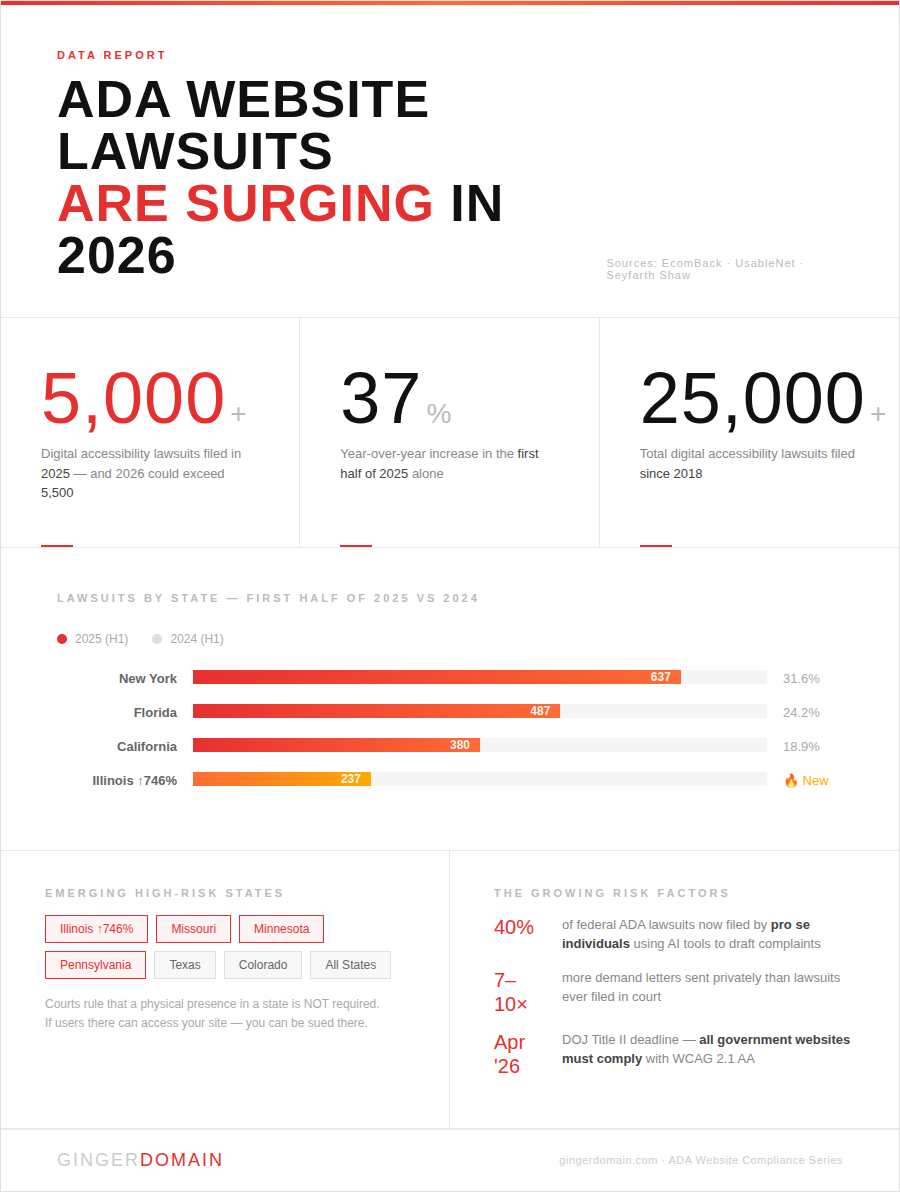
- Over 5,000 digital accessibility lawsuits were filed in 2025 alone, with projections suggesting 2026 could exceed 5,500 cases.
- In the first half of 2025 alone, 2,014 lawsuits were filed a 37% increase year-over-year.
- Since 2018, more than 25,000 digital accessibility lawsuits have been filed across the country.
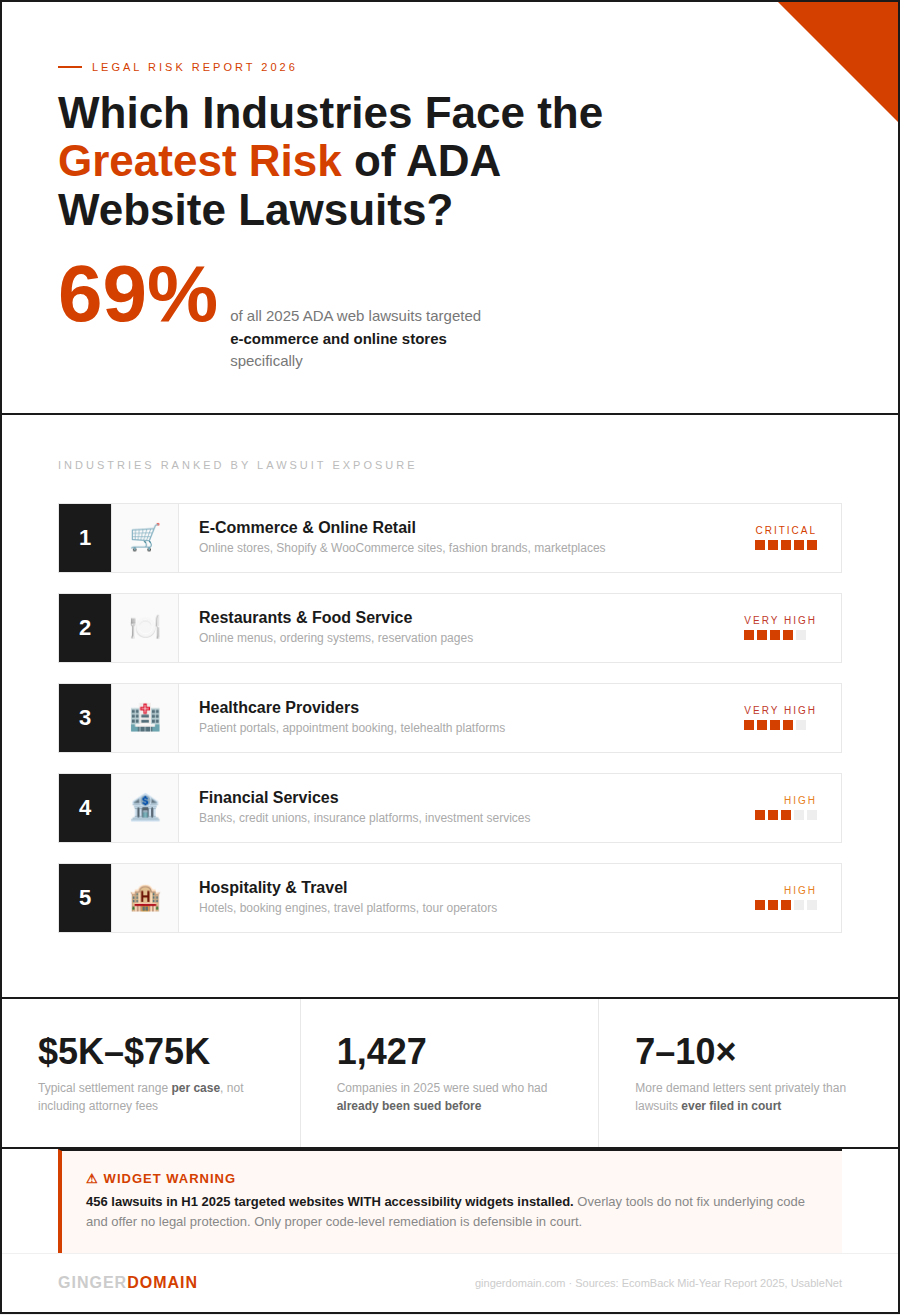
- 1,427 of the 2025 lawsuits targeted companies that had already been sued before meaning a prior lawsuit significantly raises your risk of being targeted again.
- Settlements typically range from $5,000 to $75,000, not including legal fees.
Beyond filed lawsuits, there is also a growing wave of demand letters private legal notices that pressure businesses into quick settlements before a case is ever filed in court. These are particularly common in Pennsylvania and California and rarely appear in public data, making the total risk even larger than the numbers above suggest.

Who Gets Sued the Most?
Not all industries face equal risk. Based on 2025 lawsuit data, these are the highest-risk sectors:
- E-commerce and online retail carry the greatest exposure. A full 69% of ADA website lawsuits in 2025 targeted online stores. If your business sells products or services online, you are in the highest-risk category.
- Restaurants and food service businesses are consistently among the most targeted, largely due to inaccessible menus and online ordering systems.
- Healthcare providers face growing scrutiny as more patient services move online.
- Financial services including banks, insurance platforms, and investment firms are regularly cited.
- Fashion and lifestyle brands round out the list of most-sued industries.
Geographically, New York, Florida, and California account for over 74% of filings, but the risk is expanding rapidly. Illinois saw a 746% spike in lawsuits in the first half of 2025 compared to the same period in 2024. Missouri and Minnesota are also emerging as active states. Courts have consistently ruled that a physical presence in a state is not required if users in that state can access your website, you can be sued there.

The “Accessibility Widget” Myth
Many business owners have purchased overlay widgets or accessibility plugins small tools that claim to make your site compliant with the click of a button. The data is now clear: these do not protect you.
In the first half of 2025, 456 lawsuits were filed against websites that had accessibility widgets installed nearly 23% of all filings. The number of widget-equipped sites being sued actually increased every month compared to 2024.
The FTC’s 2025 settlement with a major accessibility widget provider for deceptive marketing claims reinforced this point. Widgets do not fix underlying code-level barriers. They create an illusion of compliance while leaving the real issues in place. The only defensible strategy is proper remediation fixing the actual code, structure, and content of your website.
What Are the Consequences of Non-Compliance?
If your website is found to be non-compliant, the consequences can include:
- Legal costs and settlements typically $5,000 to $75,000 per case, and higher for repeat violations
- Court-ordered remediation you may be required to fix your site under a legal agreement with monitored deadlines
- Reputational damage lawsuits are public record and can affect customer trust
- Repeat targeting businesses that settle once are frequently targeted again if they do not fully remediate
An important new risk factor in 2026: AI tools have dramatically lowered the barrier to filing complaints. Individuals without legal representation can now use AI to identify violations on your site and draft a legal complaint in minutes. Federal pro se ADA Title III lawsuits increased 40% in 2025 as a result. This means the pool of potential plaintiffs is no longer limited to law firms it includes any individual who encounters a barrier on your site.
A Quick Compliance Checklist
Here are the highest-impact areas to audit on your website:
- Alt text on all images — every non-decorative image needs a descriptive text alternative
- Color contrast ratio — text must meet a minimum 4.5:1 contrast ratio against its background
- Keyboard navigation — every page, form, menu, and interactive element must be usable without a mouse
- Video captions — all videos must have accurate closed captions
- Form labels — every input field must have a clear, associated label
- Error messages — forms must identify what went wrong and how to fix it
- Accessible PDFs — downloadable documents must also meet accessibility standards
- Descriptive link text — avoid “click here” in favor of meaningful anchor text
This checklist covers the most commonly cited violations in ADA lawsuits, but a full WCAG 2.1 AA audit covers over 50 criteria across your entire website.

There are three common approaches businesses take:
- Automated scanning — Tools like WA VE, axe, or Lighthouse can identify obvious issues quickly. However, automated scans catch only about 30–40% of accessibility issues. They are a good starting point but not a complete solution.
- Manual expert audit — A trained accessibility specialist reviews your site against all WCAG 2.1 AA criteria, including keyboard navigation, screen reader behavior, and cognitive accessibility. This is the most thorough approach and the one that holds up in court.
- Remediation and ongoing monitoring — After fixing identified issues, your site needs regular monitoring. Every time you update content, add a new page, or install a plugin, new barriers can be introduced.
For most businesses, the smartest approach is to work with an agency that understands both the technical requirements and the legal context — ensuring your site is genuinely accessible, not just surface-level compliant.
Frequently Asked Questions
Does the ADA apply to my small business website?
Yes. The ADA applies to businesses that serve the public, regardless of size. There is no small business exemption for web accessibility under current law.
Is there an official government deadline for private business websites?
The April 2026 deadline is currently specific to state and local government websites. However, private businesses have been subject to ADA Title III lawsuits for years, and courts have ruled in favor of plaintiffs consistently.
What is the difference between ADA compliance and Section 508?
Section 508 applies specifically to federal agencies and companies that do business with the federal government. ADA Title III applies broadly to businesses that serve the public. Both point to WCAG 2.1 AA as the technical standard.
Can I use an accessibility widget to become compliant?
No. Data from 2025 shows that nearly 23% of ADA lawsuits were filed against sites with widgets installed. Widgets do not fix your underlying code and do not provide legal protection.
What does an ADA website audit actually involve?
A proper audit includes automated scanning, manual testing with screen readers and keyboard navigation, and a review of all WCAG 2.1 AA criteria across every page type on your site.
How long does it take to make a website ADA compliant?
It depends on your site’s size and current state. A small business site might take 2–4 weeks. Larger or more complex sites can take several months. The earlier you start, the better.
The Bottom Line
ADA website compliance is not optional, and the consequences of ignoring it are growing every year. With over 5,000 lawsuits filed in 2025 and a new wave of AI-assisted filings making litigation easier than ever, the question is no longer whether businesses need to act — it is how quickly they can do it. The good news is that compliance is achievable. With the right audit, the right fixes, and the right ongoing monitoring, you can protect your business, serve all your customers, and turn accessibility into a competitive advantage rather than a liability.